How bulk buys affect your tax report
Beta: Bulk buys are being tested and aren't available to everyone yet. If you don't see Bulk buys under Manage in the menu, the feature isn't turned on for your account. If you'd like it turned on for your account, email us at support@flipwise.app
New to bulk buys? Start with How do I track bulk buys?
The short answer
Changing a bulk buy can change the numbers on a tax report for a year that has already ended. Flipwise never makes that kind of change without showing you first: before it saves, it names the tax reports that would change. When there's a choice, the answer Flipwise recommends is already selected and marked Recommended. It changes the fewest closed years. When you convert a purchase location, an answer is marked Recommended only if it changes no closed year.
A bulk buy's cost shows up in four lines of your tax report's Inventory and COGS section:
| Line on the tax report | Which year |
|---|---|
| Starting inventory value | Every year that starts with items from it still unsold. It's the year before's ending value. |
| Spent on new inventory | The year you bought the bulk buy. |
| Ending inventory value | Every year end when items from it were still unsold. |
| Cost of goods sold (COGS) | The year each item sold, or was donated or discarded. |
Your income and expenses are never affected.
Because one cost counts in several years, one edit can reach several of them. For example, you bought a $120 bulk buy of six items in March 2024, and one item sold in 2025. In 2026 you find a receipt and correct the total to $150. That changes what you spent in 2024, what your unsold items were worth at the end of 2024 and 2025 (and so at the start of 2025 and 2026), and, if the sold item's cost changes too, your 2025 cost of goods sold.
What a closed tax year is
A tax year is closed as soon as it has ended. Flipwise doesn't know whether or when you filed your return, so it treats every year that has ended as one whose numbers you may already have used.
- There's no grace period. For a store whose tax year runs January to December, 2025 is closed from January 1, 2026.
- It follows your store's tax year and time zone. If your tax year runs April 6 to April 5 (UK) or July 1 to June 30 (Australia), years show as "2024/25".
The protection covers bulk buys only. Editing the cost or date of an item that isn't in a bulk buy doesn't show these screens.
What you'll see before a change saves
When a change to a bulk buy would change a closed year's numbers, Flipwise stops and shows you a screen before saving anything. A screen that states a change ends with a bold line naming the tax reports that change, such as This changes your 2024 and 2025 tax reports. When orders would move between lots, the screen says which tax reports can change instead. A screen that asks you to choose says under most answers which tax reports that answer changes, or that they don't change. Every one links back to this article.
Cancel (or Back, when you're converting a purchase location) leaves every item's cost and purchase date as they were. If you were adding a new item, it's saved, just not in the bulk buy.
A statement, when there's no way around it
Some changes can't avoid a closed year. If you bought a bulk buy in 2024 and change its total in 2026, what you spent in 2024 changes, whatever else you choose. Flipwise says so plainly. Click the button to go ahead, or Cancel.
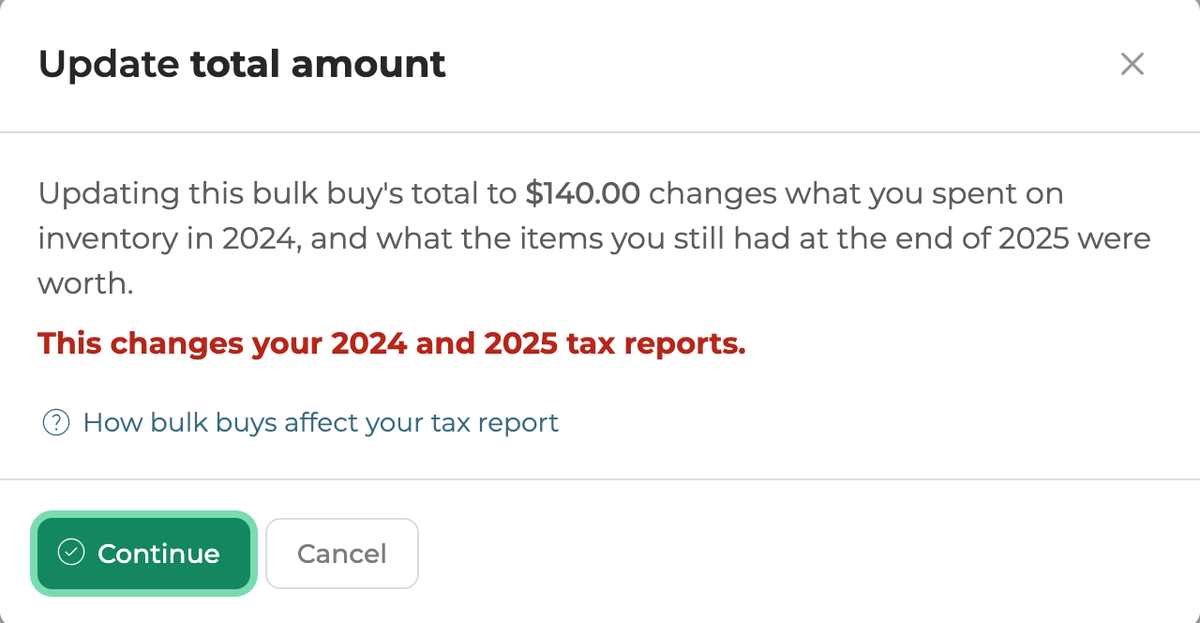
A choice, when items already sold in a closed year
When you change a bulk buy's total, or an item's cost, the other items' costs are split again. If some of those items sold in a closed year, Flipwise asks what to do with their costs:
- Keep the costs of items sold in 2025. Already selected, and marked Recommended. The items that sold keep the cost your 2025 tax report already used. The rest of the total is split across the other items. Your 2025 cost of goods sold stays the same.
- Split the bulk buy total evenly across every item. Every item is re-priced, including the ones that sold. This changes the cost of goods sold on the report for the year they sold.
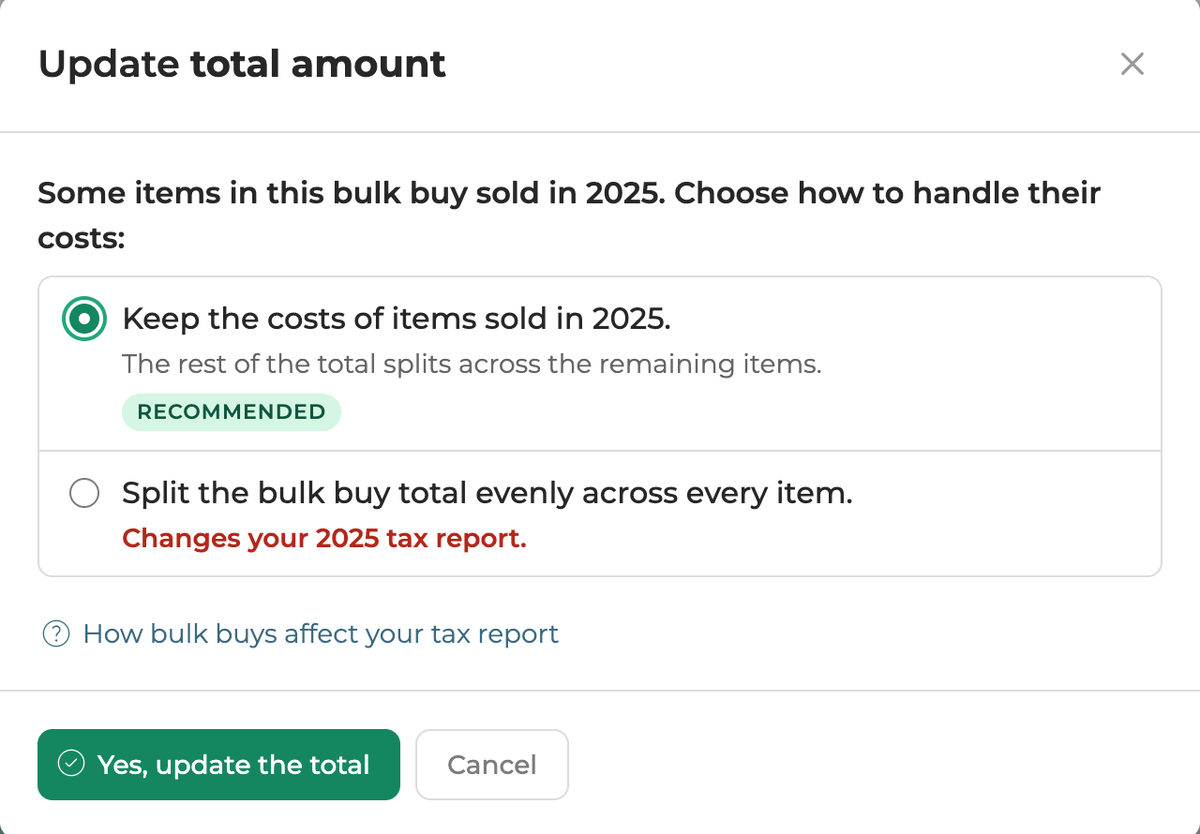
The same question covers items you donated or discarded, since their cost counts on the tax report the same way a sold item's does.
If the new total is less than the costs that would be kept, Flipwise refuses it and tells you the lowest total that works.
A choice, when you add an item bought in a closed year
Adding an item to a bulk buy normally gives it the bulk buy's purchase date and a share of its total. If the item was bought in a closed year, that would move its cost out of the year that already counted it. So Flipwise asks how to handle the item's date and cost. The first answer is already selected and marked Recommended. It keeps every tax report as it is.
Flipwise also asks this when you add an item bought this year to a bulk buy bought in a year that has ended, if that bulk buy has no total, no other item taking a share, or not enough of its total left for the item's cost.
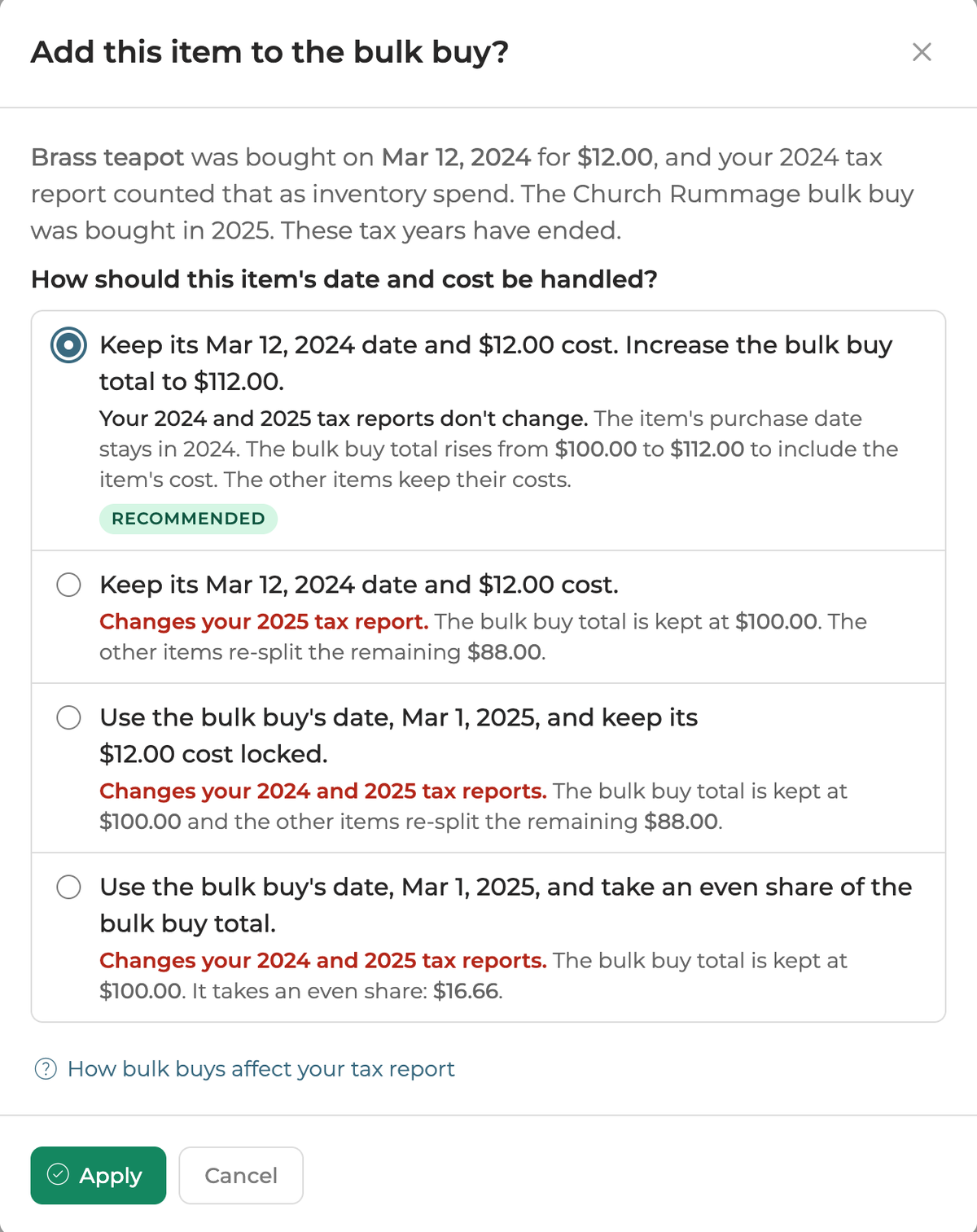
Under each answer, a line starts by saying which tax reports it changes, in orange, or that they don't change.
Held costs: the lock with a clock
In a bulk buy's items table, a lock with a small clock beside a cost means the cost is held: Flipwise keeps it as it is because a closed year's tax report depends on it. A held item doesn't take a share of the total when the costs are split again without asking you.
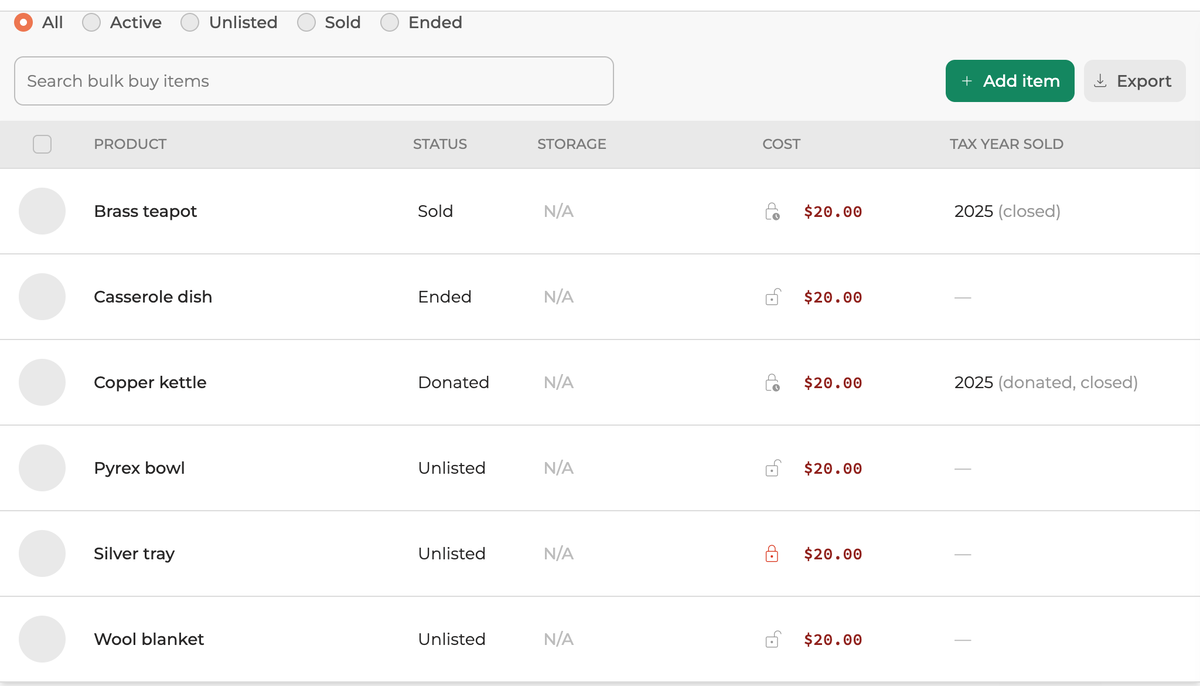
An item's cost is held for one of three reasons:
- It sold, or was donated or discarded, in a closed year. This happens automatically. If you had locked its cost yourself, it shows the red lock instead, and Flipwise asks before you unlock it.
- It kept its own cost when you added it, because it was bought in a closed year and you chose to keep its cost.
- It kept its own purchase date and cost when you added it, for the same reason. Changing the bulk buy's purchase date doesn't move this item.
Click the icon to see which reason applies. The Tax year sold column also shows the year each item sold, marked (closed) once that year has ended.
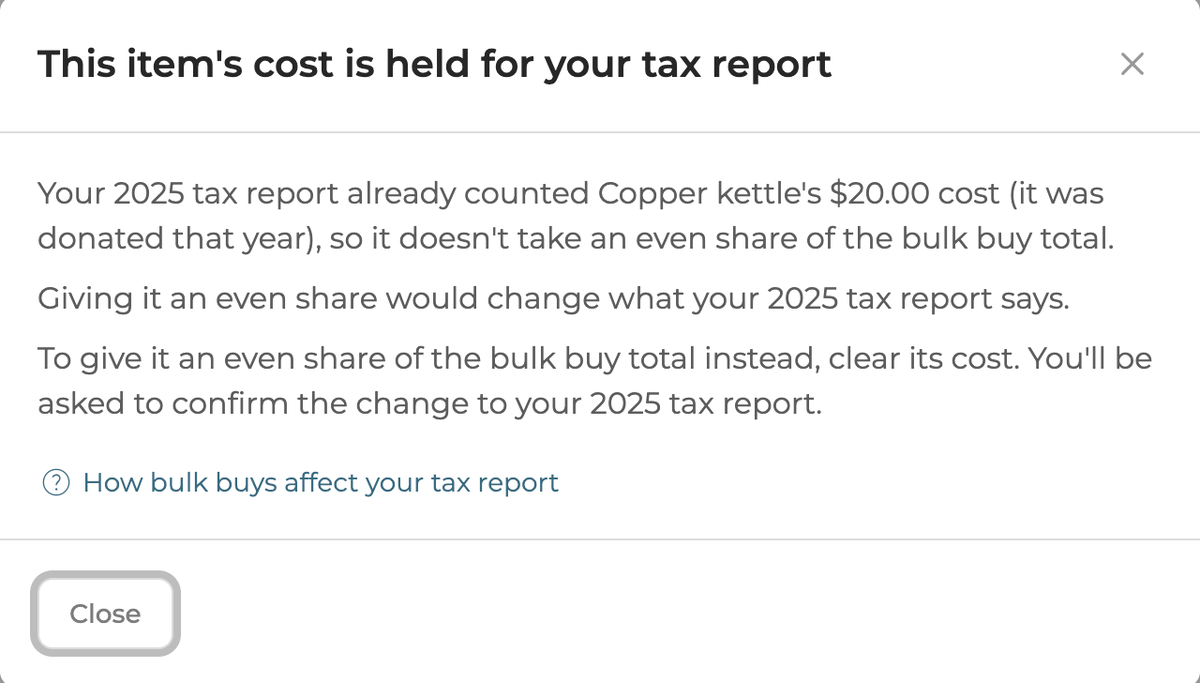
To give a held item an even share instead:
- Sold, donated or discarded in a closed year: clear its cost and confirm the change to that year's report. Or, the next time you change the total, choose Split the bulk buy total evenly across every item.
- Kept its own cost: clear its cost.
- Kept its own purchase date: remove it from the bulk buy and add it again, and choose a different answer.
Other changes that can affect a closed year
Changing a bulk buy's purchase date
Moving a bulk buy's purchase date into a different tax year moves what its items cost from one year to the other. If either year is closed, Flipwise names the reports that change before saving. Moving the date within the same tax year doesn't ask about tax years, though it can still ask about orders moving between lots (see below).
Items that kept their own purchase date when you added them stay where they are.
When sales move between lots
Flipwise assigns each sale to the oldest stock of that product first. If you have the same product in more than one lot and a new purchase date makes one lot older or newer than another, some sales can move to the other lot and pick up its cost. This can change cost of goods sold even when the date stays in the same year. When you change a bulk buy's date, add or move an item, change or clear the purchase date on an item's own page, convert a purchase location or move items while deleting a bulk buy, Flipwise lists the items affected and asks before saving. A bulk tool lists the affected items on its review screen. There's no option to keep the old order: you can go ahead or cancel.
Connecting an item to its listing
When you connect an unlisted item from a bulk buy to its eBay listing, the listing's sales take the item's cost. If the listing sold in a year that has ended, that changes that year's cost of goods sold, and what was in stock at the end of every closed year since. So Flipwise names the tax reports that change before connecting. Click Apply to connect, or Cancel. An item with no cost changes nothing, so connecting it doesn't ask.
Donated and discarded items
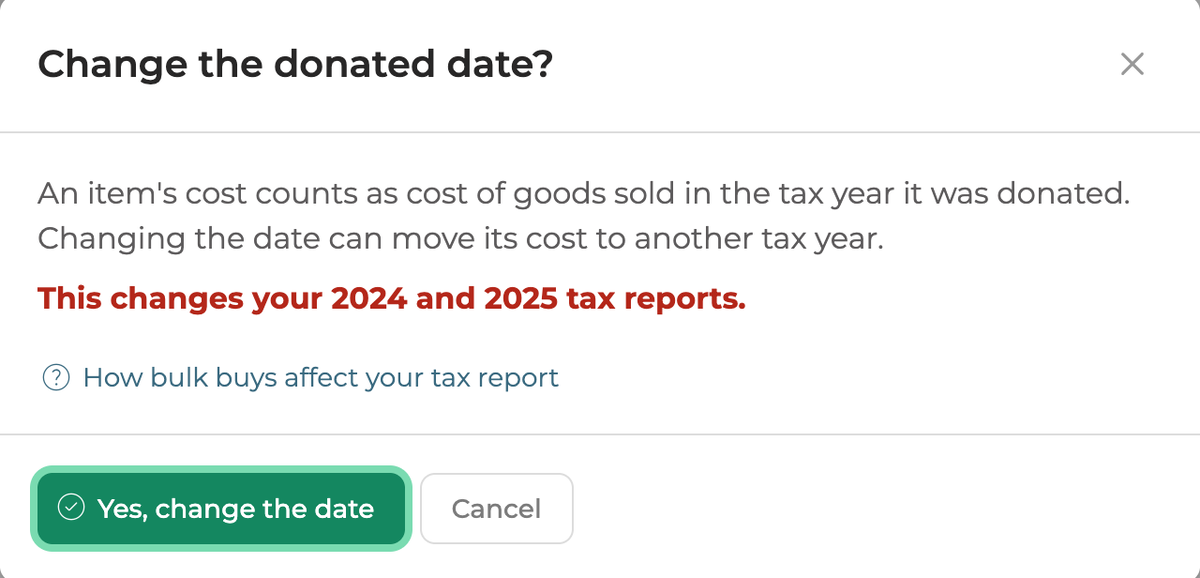
A donated or discarded item's cost counts as cost of goods sold in the year you donated or discarded it, just like a sale. So for an item in a bulk buy, Flipwise asks before you:
- change its Donated on or Discarded on date into a different tax year, when that moves a closed year, or
- unmark it as donated or discarded, when that changes a closed year. Unmarking puts the item back in your inventory.
Switching an item between donated and discarded keeps the same date, so nothing moves and nothing asks.
Returned and cancelled sales
A sale that was returned or cancelled doesn't count. The tax report puts the item back in your inventory, so Flipwise treats it like an unsold item: its cost isn't held, and it takes a share of the total like the others.
Bulk tools
The bulk tools in your Inventory and Sold tables can't ask you a question for each item. Instead, where there's a choice, each item takes the answer that leaves closed years as they are. A review screen lists what will happen before anything is applied, including any tax report that still changes. Click Ignore warnings and apply to go ahead, or Cancel.
Remove from bulk buy, in the Edit menu on a bulk buy's page, works the same way: an item that sold, or was donated or discarded, in a closed year keeps its cost, and the review names any tax report that still changes. Click Remove from bulk buy to go ahead, or Cancel.
Deleting an item that's in a bulk buy from its own page, or a single lot with its trash icon on the Lots page or the Unlisted list, works the same way: it comes out of the bulk buy as Remove from bulk buy takes it out, and Flipwise says what happens before you click the button that removes and deletes it.
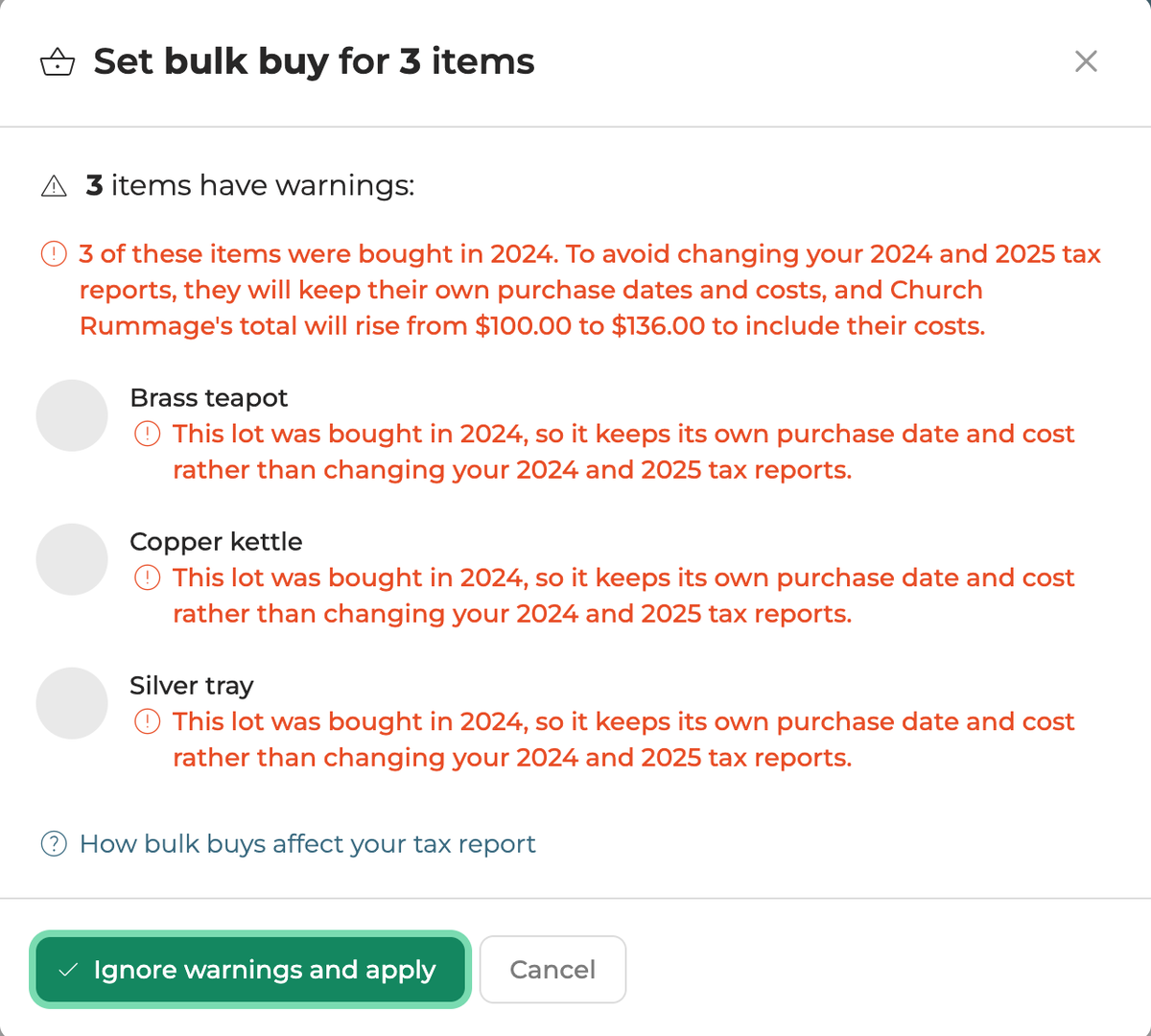
Some bulk tools don't work on bulk buy items, because they'd need to ask first:
- Set purchase date and Set purchase location: change these from the bulk buy instead.
- Set purchase price on an item that sold, or was donated or discarded, in a closed year: change it from the item's own page instead.
- Delete, on items that are in a bulk buy: delete each one from its own page instead, or remove them from the bulk buy first.
If you want a choice the bulk tools don't make, such as splitting a total evenly across items that sold in a closed year, make the change from the bulk buy's page or the item's page.
Deleting a bulk buy
Deleting a bulk buy without moving its items leaves every item with its current purchase date and cost, so no closed year changes. If you move the items to another bulk buy instead, Flipwise asks how to handle their dates and costs, the same way it does when you add an item.
Common questions
Which answer should I choose?
If you've already filed or prepared your return for that year, choose the answer marked Recommended. It changes the fewest closed years. If no answer is marked Recommended, read the lines under the answers: most say which tax reports that answer changes.
Choose an answer that changes a closed year only when you mean to correct that year, for example because you found a receipt showing you paid a different amount. Your tax report for that year will then show different numbers from the ones you may already have used, so check with your tax professional about whether to amend your return.
Why am I seeing these screens on January 1?
A tax year closes the day after it ends, with no grace period. So in January, last year already counts as closed, even if you haven't filed yet. If you haven't used last year's numbers yet and want to correct them, you can choose the answer that changes that year.
Why does a screen name a year whose numbers end up the same?
Flipwise errs on the side of caution. Occasionally it names a year that turns out not to change, so that it never misses one that does.
Does this apply to items that aren't in a bulk buy?
No. Changing the cost or purchase date of an item that isn't in a bulk buy doesn't show these screens, even if it changes a closed year.
Can I see which items are tied to a closed year?
Yes. On the bulk buy's page, the Tax year sold column shows the year each item sold, or was donated or discarded, marked (closed) once that year has ended. Items with a held cost show a lock with a clock beside their cost. See Held costs above.