How To Import Missing Shipping Label Costs
When Flipwise syncs your listing and sales data with eBay, sometimes the shipping label costs are still missing from your Sold Items. You can read about some of the reasons why here:
Why does Flipwise not automatically import my shipping label costs?
If you would like to fill in these label costs, there is a way to do so through a bulk import. Follow these steps:
- Go to your eBay Seller Hub.
- Click "Performance", then "Sales".
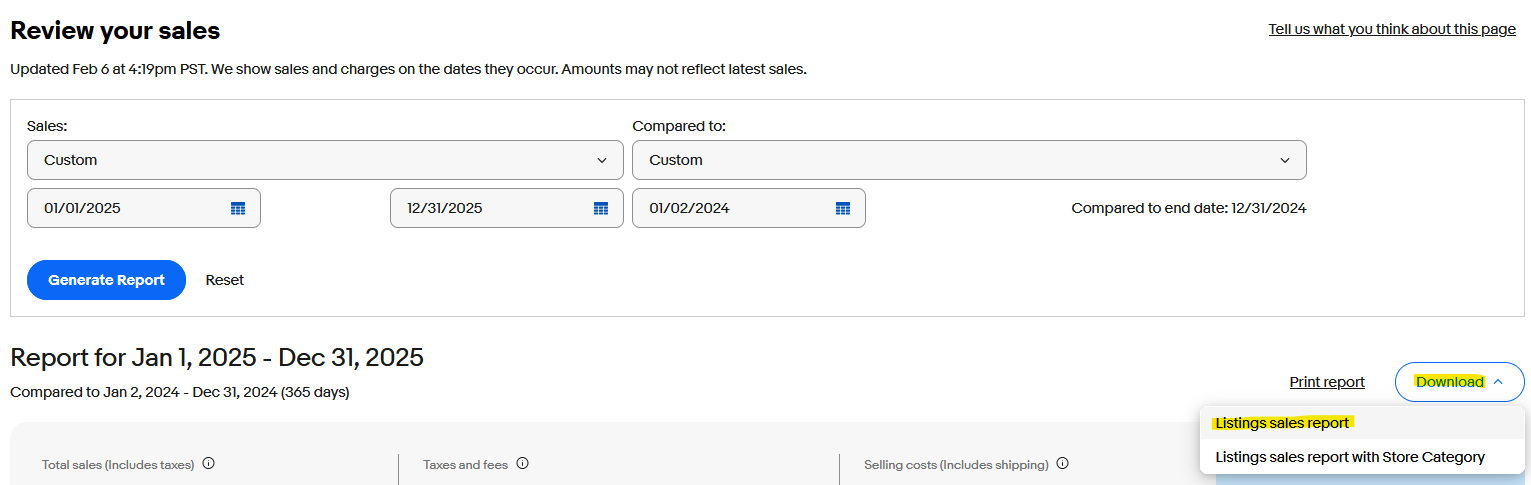
- At the top will be a date filter drop down. Choose the date range you would like to cover, which may require the "Custom" option, which lets you choose a start and end date. The "Compared to:" option is not important.
- Click "Generate Report".
- You will see the page update with some overall numbers. Click the "Download" button on upper right hand side, and then select "Listing Sales Report":
This will produce a CSV file. Send the file to support@flipwise.app, and we will get it imported for your right away.
Notes
- The maximum date range on this report is 365 days, so if you need to generate reports for a longer period of time, simply create multiple reports.
- You are welcome to open and view the CSV before sending it, but if you open it in Microsoft Excel, don't re-save the file. Excel will alter the formatting of one of the ID columns and make it unusable. Just send over the CSV file as is, straight from the download.
Important: This will not import label costs for items that have sold multiple times. For example, if you have a Multi-Quantity listing with several sales, those individual label prices won't import, unfortunately. Those prices will still need to be added manually in Flipwise.